
How To
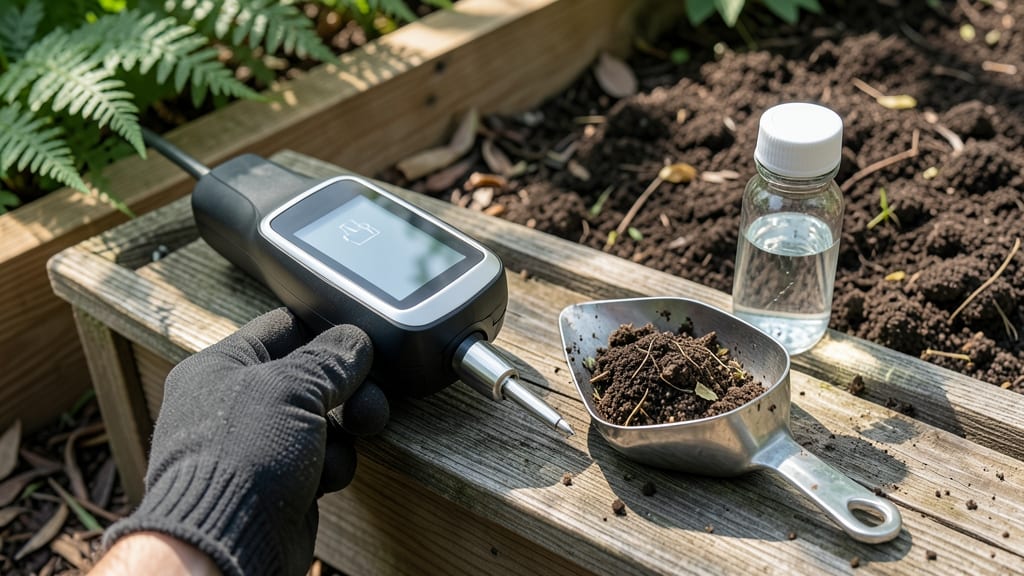
A digital soil pH meter could be the secret weapon in your gardening toolkit—if you know how to use it right. 🌱 The problem isn’t just testing soil; it’s getting accurate readings that actually help your plants thrive.
My first meter gave me numbers that made no sense until I learned the calibration tricks that make all the difference.
Start with clean, moist soil and a properly calibrated meter—most need a quick rinse in pH 7.0 water before testing. The numbers you get (5.0 to 8.0) tell you whether your soil is too acidic, too alkaline, or just right for what you’re growing.
Tomatoes love 6.0-6.8, while blueberries demand 4.5-5.5—knowing this means you can tweak your soil before planting, not after.
When the meter reads off, don’t panic—most issues fix easily. A reading that jumps wildly? Clean the probes. Still inconsistent? Calibrate again or test in multiple spots. The goal isn’t perfection; it’s getting numbers you can trust to adjust your soil with lime, sulfur, or organic amendments.
Once you master this, you’ll save time, money, and frustration. No more guessing why your plants look sick when the real issue was hidden in the soil. Here’s how to get it right the first time—so your garden finally grows like you’ve always hoped.
📚 In This Guide
- What you need
- Instructions
- Tips and common mistakes
- Wrapping up and next steps
What you need
- ● Digital Soil pH Meter – Choose a high-quality, waterproof model with automatic temperature compensation (e.g., Bluelab, Apera, or generic Bluetooth-enabled meters).
- ● pH Buffer Solutions – Two calibration liquids: pH 4.00 buffer (acidic range)
- ● pH 7.00 buffer (neutral range)
- ● Distilled or Deionized Water – 1–2 liters (tap water can introduce contaminants).
- ● Soft-Bristle Brush or Cleaning Cloth – For gently cleaning the probe.
- ● Small Plastic Container – 4–6 oz capacity (for buffer solutions).
- ● Rubber Bands or Labels – To mark containers or secure probe tips.
- ● pH 10.00 Buffer – For extended calibration ranges (useful for alkaline-heavy soils).
- ● Microfiber Towels – Prevents scratching the probe’s sensitive glass electrode.
- ● Calibration Logbook – Track readings over time to spot meter drift.
- ● Portable pH Meter Stand – Keeps the probe stable during calibration.
How to calibrate your digital soil pH meter for reliable readings
Skip the guesswork—here's how to get your meter dialed in for garden-ready accuracy.
📏 Step 1: Prepare the Meter and Calibration Solutions
Unpack your digital soil pH meter and locate the calibration button (usually labeled "Cal" or "Set"). Most meters come with two calibration solutions: a pH 4.0 and a pH 7.0 buffer solution—these are your accuracy anchors. Check the user manual for your specific model to confirm which solutions came with it.
Fill a clean container with 100ml of the pH 7.0 solution. Use a separate container for the pH 4.0 solution to avoid cross-contamination. The solutions should be at room temperature—cold or warm liquids can throw off readings. If your meter doesn’t include solutions, purchase them from a garden supply store or online (they’re often sold as "pH calibration buffers").
🔄 Step 2: Perform the Two-Point Calibration
Insert the meter probe into the pH 7.0 solution and wait 30 seconds for the reading to stabilize. Press and hold the calibration button until the display shows "Cal 7.0" or a similar confirmation. Release the button—this locks in the upper calibration point. Most meters automatically switch to the next step, but check your manual if it doesn’t.
Rinse the probe thoroughly with distilled water (tap water can leave mineral deposits that skew readings). Then, immerse it in the pH 4.0 solution and wait another 30 seconds. Press the calibration button again until the display confirms "Cal 4.0." This two-point calibration ensures accuracy across the full pH range your plants need (most garden soils fall between 6.0 and 7.0).
🌱 Step 3: Test the Meter with Known Soil Samples
Once calibrated, rinse the probe again and test it in a soil sample you know the pH of—ideally, a commercial pH-tested soil mix or a sample from a trusted gardening friend. Mix 2 cups of soil with 1 cup of distilled water in a clean container, stir well, and let it sit for 10 minutes to settle. Insert the probe into the soil-water mixture and wait 60 seconds for the reading to stabilize.
Compare the meter’s reading to the known pH of your test soil. If the numbers match within ±0.2 pH units, your meter is calibrated correctly. If not, repeat the two-point calibration—sometimes probes need recalibration after a few uses, especially if stored improperly. Store the meter probe in its case or a dry place when not in use to prevent corrosion.
⚠️ Step 4: Maintain Calibration Between Uses
Calibrate your meter once every 3 months or before the start of each growing season, even if it seems accurate. Soil minerals, probe wear, and temperature fluctuations can drift readings over time. Keep the calibration solutions in a cool, dark place—they degrade with light and heat exposure, losing their accuracy.
Here’s the thing—don’t skip calibration just because the meter "feels" right. A drift of 0.5 pH units can mean the difference between thriving tomatoes (6.0-6.8) and struggling blueberries (4.5-5.0). After calibration, test your meter in a small pot of known-pH soil before relying on it for your entire garden. It’s a quick check that saves you from costly mistakes.
Tips & tricks for precision soil pH meter calibration
Here's what nobody tells you about getting pinpoint accuracy with your soil pH meter—these tricks make all the difference.
Solution Temperature Matters: Those 30-second waits in Step 2 aren't just about patience—they're about letting the solutions reach room temperature first. Cold solutions can make your meter read up to 0.3 pH units lower, while warm solutions might show higher readings. I keep my calibration solutions in a small insulated container at room temp for 10 minutes before using them. This ensures consistent results every time, especially if you're working in cooler climates.
Probe Cleanliness is Non-Negotiable: After rinsing with distilled water between solutions, I give the probe a quick wipe with a soft microfiber cloth to remove any residual moisture. Leftover water droplets can dilute the calibration solutions slightly, causing readings to drift. For stubborn mineral buildup, I soak the probe in white vinegar for 5 minutes between uses—it cuts through deposits without damaging the sensor.
Visual Calibration Confirmation: When your meter shows "Cal 7.0" or "Cal 4.0," don't just trust the screen—watch for the needle or digital display to stabilize completely. Some meters flicker between readings for a second or two after calibration. I wait an extra 5 seconds after the confirmation appears to ensure the meter has fully locked in the calibration point. This prevents false accuracy readings during your actual soil testing.
Test Soil Preparation Hack: For that 10-minute settling time in Step 3, I actually let the soil-water mixture sit for 15 minutes if I'm testing heavy clay soils. Clay particles take longer to fully disperse, and if they clump around the probe, they can give you artificially low readings. Stir the mixture one last time right before inserting the probe to ensure an even distribution of soil particles.
Pro Tips for Digital Soil Ph Meter
- Here's what nobody tells you about getting pinpoint accuracy with your soil pH meter—these tricks make all the differ...
- Solution Temperature Matters: Those 30-second waits in Step 2 aren't just about patience—they're about letting the so...
- Probe Cleanliness is Non-Negotiable: After rinsing with distilled water between solutions, I give the probe a quick w...
Frequently asked questions
Got questions about using a digital soil pH meter? You’re not alone! Here are answers to the most common queries to help you get the most accurate readings in your garden.
How often should I calibrate my digital soil pH meter?
Calibrate your meter before every use or at least once a month if you’re testing regularly. Soil conditions, battery life, and environmental factors can affect accuracy. A quick two-point calibration (using pH 4.0 and 7.0 buffers) ensures reliable results every time.
Why is my digital pH meter giving inconsistent readings?
Inconsistent readings often stem from dirt buildup on the probe, low battery, or improper calibration. Clean the probe with distilled water, recalibrate, and check your battery. If issues persist, try testing in a different soil sample or with a different meter.
How long should I wait for an accurate pH reading?
Most digital meters provide a reading in 30 seconds to 2 minutes. Stir the soil-water mixture well, then wait until the display stabilizes. Rushing can lead to inaccurate results—patience is key for precision!
Can I use a digital pH meter in wet or frozen soil?
Avoid testing in waterlogged or frozen soil—both can skew results. Wait for soil to dry slightly (but not completely) or thaw before testing. For frozen ground, let it warm to room temperature first or test in a controlled environment.
What’s a good alternative if my digital pH meter isn’t working?
If your meter fails, try a test kit with color-coded strips (less precise but budget-friendly) or send a soil sample to a local extension office for lab testing. For quick fixes, a DIY vinegar/baking soda test can give a rough pH estimate.
Wrapping up and next steps
Mastering your digital soil pH meter is the first step toward unlocking the full potential of your garden! With precise calibration and proper use, you’ll create the ideal growing conditions for your plants—whether you’re nurturing flowers, veggies, or herbs. 🌱
Ready to take it further? Start by testing different soil samples across your garden and document your findings. Over time, you’ll refine your approach and watch your plants thrive like never before! Happy gardening!